In the field of software development and operations, grayscale release is a critical strategy that reduces risks and the scope of impact by gradually rolling out new versions to users. Different platforms have variations in implementing grayscale releases because they need to adapt to their respective requirements and limitations.
This article will compare and analyze the implementation methods of grayscale release on mainstream platforms such as Zadig, Alibaba Cloud, Harness, Spinnaker, and Argo Rollouts. We will delve into their usage conditions, principles, and processes, and conduct a horizontal comparison to help you choose the platform that best suits your needs.
# Platform Differences Comparison
| Platform | Supported Workload Types | Cost of Using Existing Services | Configuration Complexity | Ease of Use | Approval Support |
|---|---|---|---|---|---|
| Zadig | Deployment, StatefulSet | No Renovation Required | Simple | ⭐️⭐️⭐️ | Supports Zadig/FeiShu/DingTalk Approval |
| Alibaba Cloud | Deployment, StatefulSet | No Renovation Required | Moderate | ⭐️⭐️ | Supported |
| Harness | Deployment, StatefulSet | No Renovation Required | Moderate | ⭐️⭐️⭐️ | Not Supported |
| Codefresh | Deployment | No Renovation Required | Moderate | ⭐️⭐️⭐️ | Not Supported |
| Spinnaker | ReplicaSet | Requires Existing Services to be Converted to ReplicaSet Type | Difficult | ⭐️⭐️ | Supported |
| Fluxcd / Flagger | Deployment | Requires Additional Declaration of Canary Resources | Difficult | ⭐️ | Not Supported |
| Argo Rollouts | Deployment | Requires Additional Declaration of Rollout Resources | Difficult | ⭐️ | Not Supported |
# Implementation Principles and Usage Processes
# Zadig
Zadig supports blue-green, canary, batched grayscale, Istio application release, and Istio full-link grayscale release strategies. Below is a brief introduction to the principle of Zadig's blue-green release. For more details on the usage of other release strategies, refer to the official documentation (opens new window).
Usage Conditions
- The workload must have a corresponding service, and the labels of the workload must include all the selector labels of the service
- The workload currently only supports the Deployment type
Principle
- Deploy the blue environment by copying the current workload, setting a new image, and creating a blue service pointing to it.
- After the blue environment is deployed, execute the user's verification tasks.
- Start the blue-green release by setting a new image for the green workload.
- After the release process is completed or interrupted, delete the blue environment, the blue service, and the blue workload.
Configuration Process
Supports both interface and YAML configuration for workflows. Zadig supports multi-service orchestration for blue-green releases, with built-in best practices, making configuration simple and easy to use. It also integrates with the system's user management, permission management, and project management to meet the personalized needs of enterprises.
Usage Process
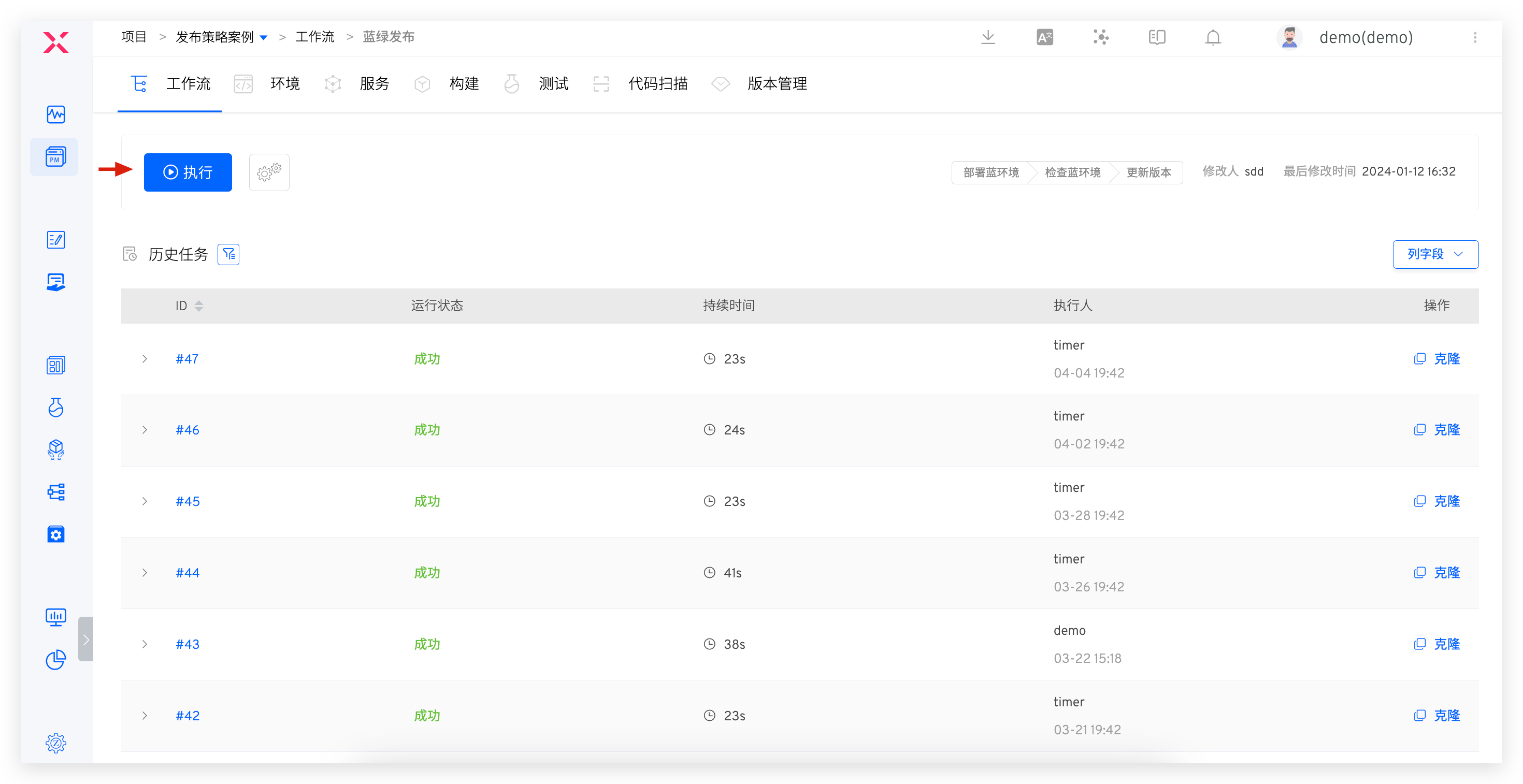
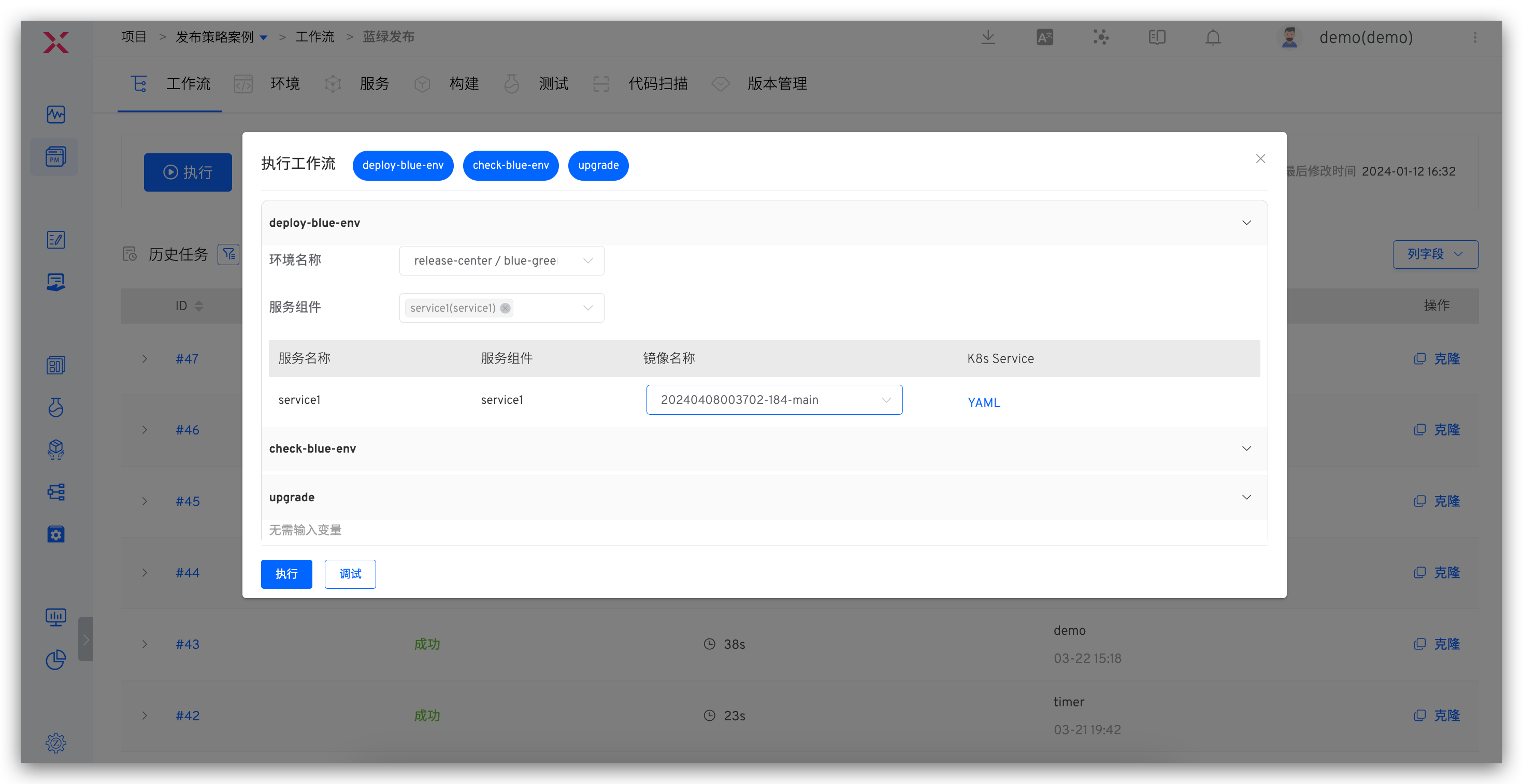
- Click the "Execute" button to select the instance and image to be updated.
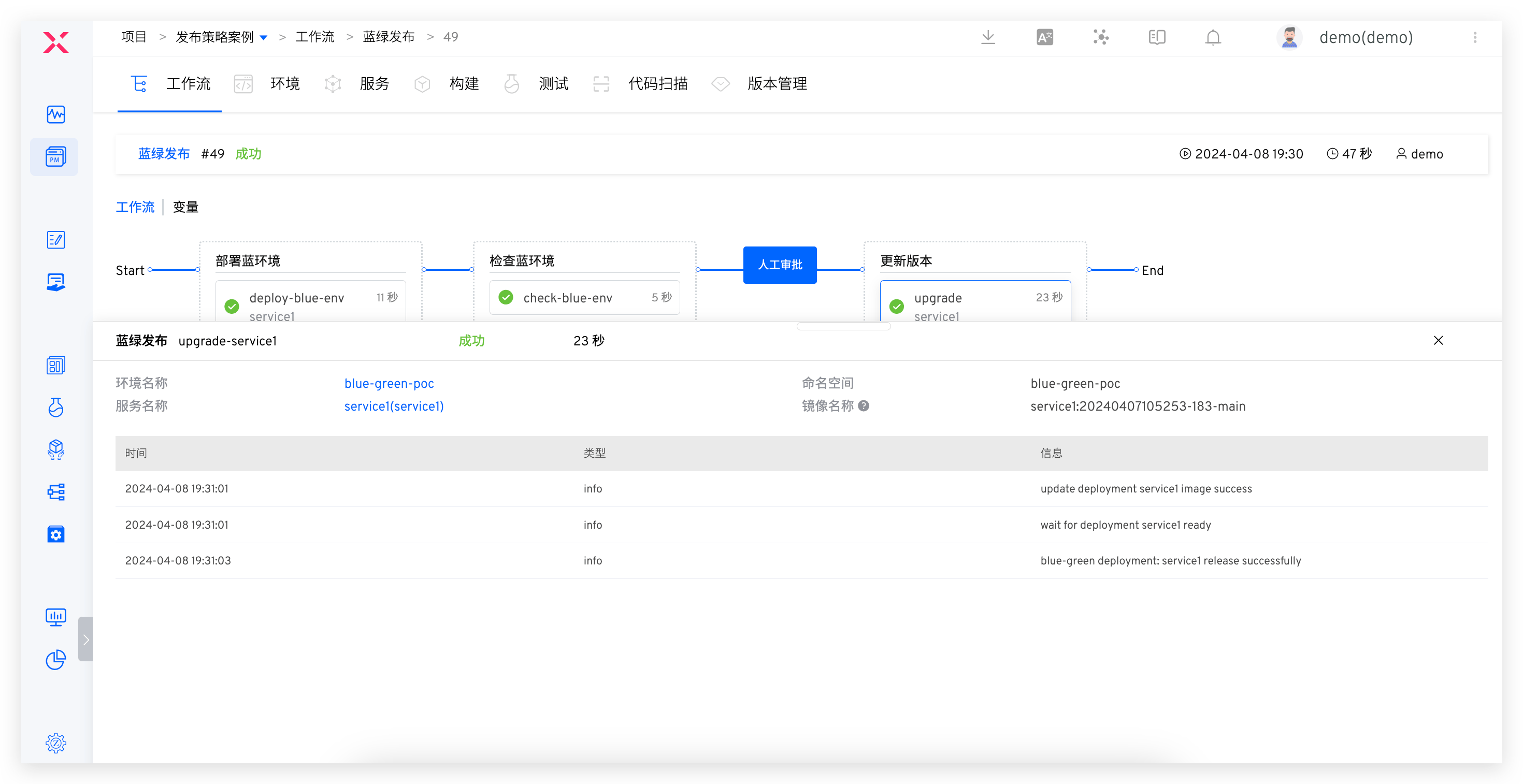
- The workflow executes according to the set tasks, and the execution status is shown in the figure below.
# Alibaba Cloud
Alibaba Cloud supports grayscale release strategies such as blue-green release and batch release. Below is a brief introduction to the principles and usage process of blue-green release, using Istio for blue-green release (opens new window).
Prerequisites
- Service/VirtualService/DestinationRule have the same name
- The Deployment's labels must include all the selector labels of the Service
Principle
- Traffic control is achieved using Istio and its VirtualService and DestinationRule resource types
- The blue-green release begins by creating a new version of the application Deployment instance in the blue environment based on the current Deployment instance
- The Service is directly associated with multiple versions of the Deployment instances through LabelSelector, allowing Istio to discover these service instances
- Update the Istio DestinationRule resource object to set subsets for different versions, and then update the VirtualService to set traffic routing rules and weights
- After manual verification is completed, the release is finalized by cutting all traffic to the blue environment and removing the original green environment instance
Configuration Process
The interface configuration for the pipeline is relatively cumbersome for blue-green release scenarios involving multiple services.
Execution Process
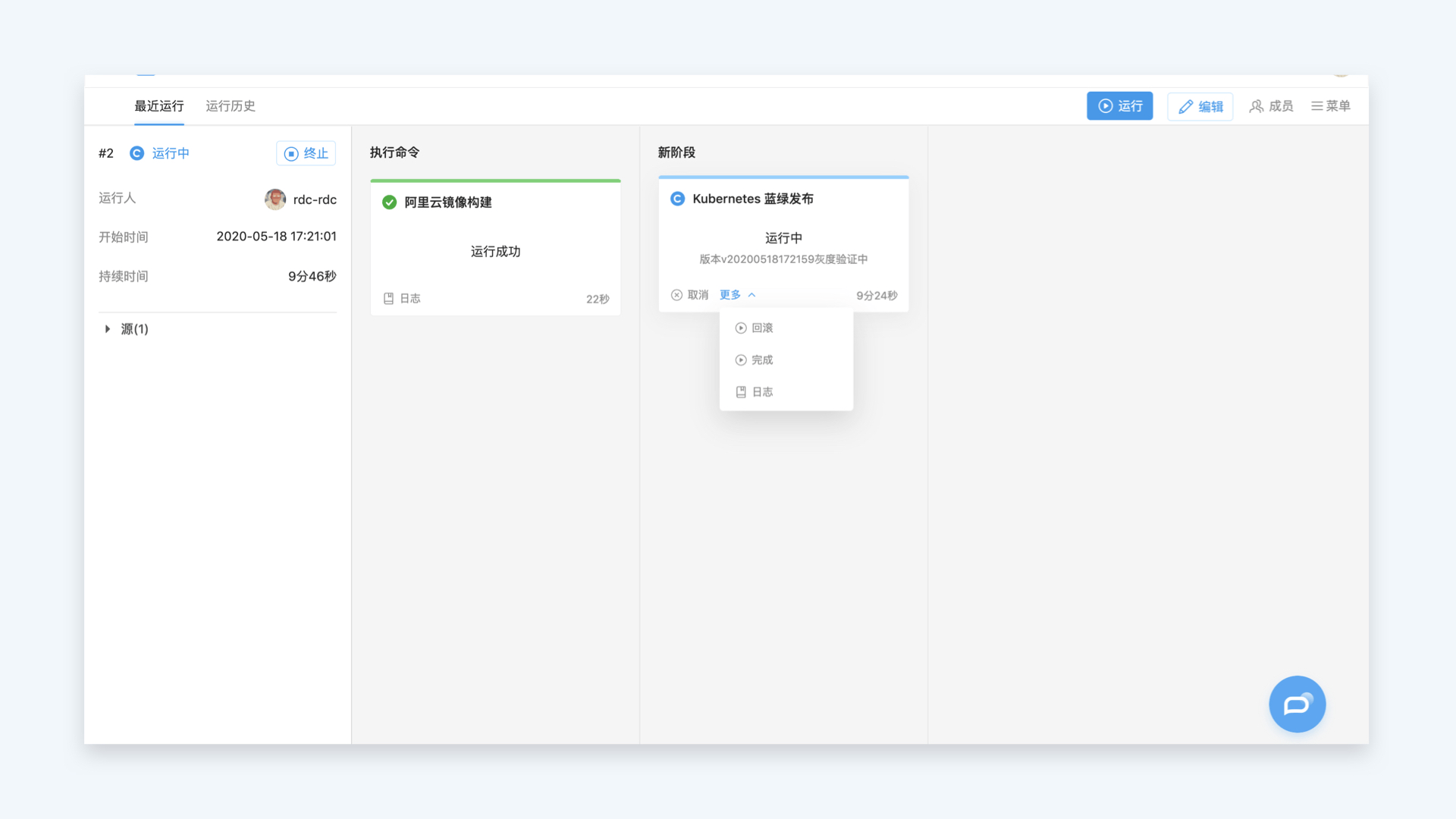
Execute the pipeline to trigger the blue-green release. Access the new version environment using the cookie flag for functional verification. If the verification is successful, click "Finish" to cut the traffic to the new version; if there are issues, click "Rollback".
# Harness
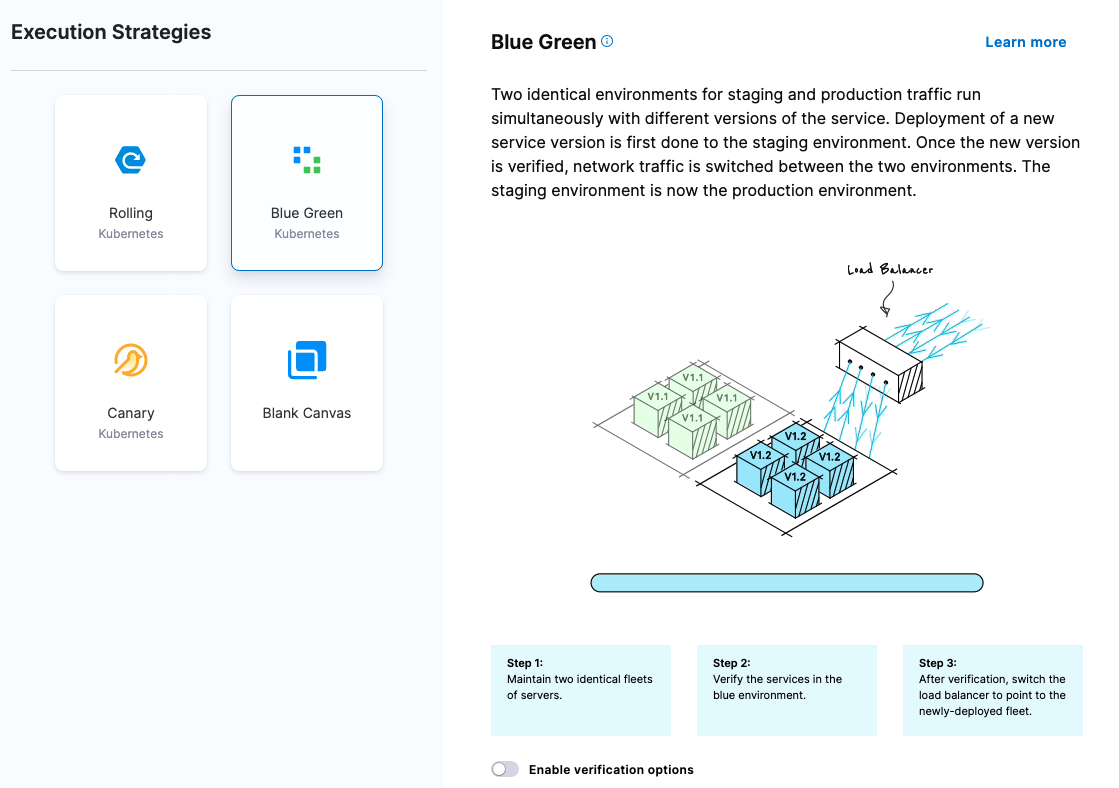
Harness supports blue-green release, rolling release, canary release, and other release strategies, supporting Deployment and StatefulSet workloads. It uses K8s native Service for traffic control. Below is a brief introduction to the execution process of Harness blue-green release (opens new window).

Principle
First deployment:
Harness creates two services and configures annotations:
- Online service: annotations: harness.io/primary-service: "true"
- Test service: annotations: harness.io/stage-service: "true"
Blue environment creates the original version of pod collection and configures annotation: harness.io/color: blue
The test service points to the blue environment pod. After the test is successful, the online service also points to the blue environment pod
Second deployment:
- Create a new version of the pod in a green environment and configure annotation, harness.io/color: green
- The test service points to the new version of the green environment pod and performs verification. After verification is successful:
- The online service points to the new version of the green environment pod, and the test service points to the old version of the blue environment pod
Third deployment:
- The old version pod in the blue environment is upgraded to the new version
- The test service points to the new version of the blue environment pod and performs verification. After verification is successful:
- The online service points to the new version of the blue environment pod, and the test service points to the green environment
Configuration Process
Interface configuration for the workflow, with many configuration items and a certain learning curve.
Execution Process
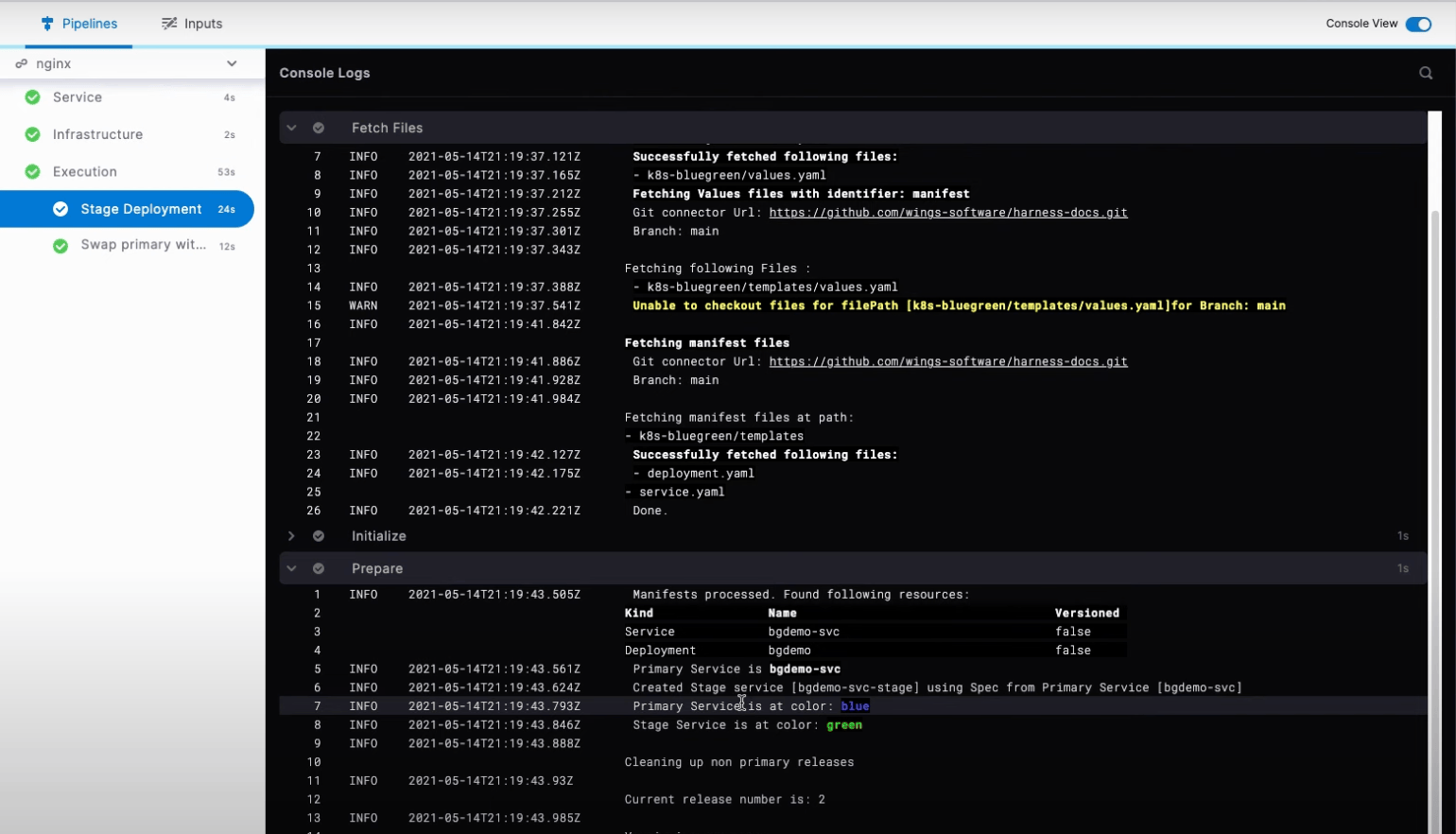
Execute the workflow to trigger the blue-green process.
# Codefresh
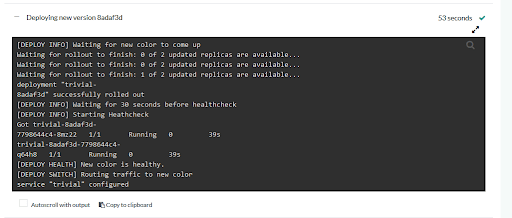
Codefresh supports blue-green release and canary release, supporting Deployment workloads. Below is a brief introduction to the process of Codefresh blue-green release (opens new window).
Principle
- Deploy the new version
- Wait HEALTH_SECONDS Time, task to do some health checks on the new version pod , or you can do some checks manually
- After the waiting time, if there are no errors, switch the traffic to the new version
- If there is an error, roll back to the previous version
Configuration Process
Define the relevant configuration for the service blue-green process in YAML in the workflow.
Execution Process
Execute the Codefresh workflow to trigger the blue-green release, which only supports blue-green release for a single service.
# Spinnaker
Spinnaker supports grayscale release strategies such as blue-green and canary, but only supports ReplicaSet type workloads. Below is a brief introduction to the process of using Spinnaker to achieve blue-green release (opens new window).
Principle
Set the Annotations traffic.spinnaker.io/load-balancers: '["service my-service"]' for the ReplicaSet. Spinnaker can automatically add labels to the Pod labels to match the my-service Selector
Configuration Process
The interface configuration for the workflow has many configuration items and a certain learning curve.
Execution Process
- Create a new version of the ReplicaSet and deploy it to the blue environment
- Spinnaker binds the new version of the ReplicaSet to the specified Service based on the Annotations
- After the test is completed, the original version of the ReplicaSet is removed through the Disable Stage
# Argo Rollouts
Argo Rollouts supports blue-green release and canary release strategies. Below is a brief introduction to the process of using Argo Rollouts blue-green release (opens new window).
Principle
- Replace Deployment with the Rollout CRD and support multiple release strategies based on its original capabilities
apiVersion: argoproj.io/v1alpha1
kind: Rollout
metadata:
  name: rollout-bluegreen
spec:
  replicas: 2
  revisionHistoryLimit: 2
  selector:
    matchLabels:
      app: rollout-bluegreen
  template:
    metadata:
      labels:
        app: rollout-bluegreen
    spec:
      containers:
      - name: rollouts-demo
        image: argoproj/rollouts-demo:blue
        imagePullPolicy: Always
        ports:
        - containerPort: 8080
  strategy:
    blueGreen:
      # activeService specifies the service to update with the new template hash at time of promotion.
      # This field is mandatory for the blueGreen update strategy.
      activeService: rollout-bluegreen-active
      # previewService specifies the service to update with the new template hash before promotion.
      # This allows the preview stack to be reachable without serving production traffic.
      # This field is optional.
      previewService: rollout-bluegreen-preview
      # autoPromotionEnabled disables automated promotion of the new stack by pausing the rollout
      # immediately before the promotion. If omitted, the default behavior is to promote the new
      # stack as soon as the ReplicaSet are completely ready/available.
      # Rollouts can be resumed using: `kubectl argo rollouts promote ROLLOUT`
      autoPromotionEnabled: false
Configuration Process
The YAML method is required to define the blue-green release process.
Execution Process
Argo provides a simple Dashboard, lacking enterprise-level management capabilities.

# Fluxcd / Flagger
Flagger supports blue-green release and canary release strategies. Below is a brief introduction to the process of using Flagger to achieve blue-green release (opens new window).
Principle
- Flagger uses the Canary type CRD to manage Deployment, thereby supporting multiple release strategies
- Boot creation service: At startup, Flagger creates three ClusterIP Services (app-primary, app-canary, app) and a blue version deployment called app-primary
- Detect new versions: When Flagger detects a new version, it expands the green version and runs consistency tests
- Perform consistency testing: Consistency testing should be performed against the app-canary ClusterIP service to access the green version
- Start load testing: If the consistency test passes, Flagger starts load testing and uses a custom Prometheus query to verify the test results
- Analyze load tests: If the load test analysis is successful, Flagger will upgrade the new version to app-primary and reduce the green version
Configuration Process
K8s YAML method configures the blue-green release process.
Usage Process
Kubectl apply mode execution does not provide an interface method and lacks enterprise-level management capabilities.
# Summary
By gaining a deep understanding of the characteristics and advantages of each platform, you can choose the grayscale release strategy that best suits your needs, thereby improving the efficiency and quality of software delivery. If you are interested in grayscale release, Istio release, and full-link release solutions, please join the official exchange group to get immediate help and support.